⚡ Key Takeaways
- ✅ “Vampire appliances” are devices that keep drawing electricity even when they appear to be off.
- ✅ Common culprits include televisions, game consoles, cable boxes, chargers, computers, printers, microwaves, and smart speakers.
- ✅ A device using just 1 watt all year costs roughly $1.40 to $1.80 annually, depending on electricity rates.
- ✅ Many households lose about $100 to $250 per year to standby power, though larger homes with lots of electronics may pay more.
- ✅ Cable boxes, older TVs, desktop computers, and “instant-on” game consoles are often among the worst offenders.
- ✅ Smart power strips, unplugging rarely used devices, and disabling standby modes can cut waste without turning life into a monastic experiment.
- ✅ The goal is not to unplug everything, but to target the quiet energy hogs that do nothing useful while nibbling at your bill.
There is a particular insult in paying for electricity you did not knowingly use. It is like discovering a raccoon has been living in your garage, charging rent to your credit card, and leaving only crumbs as evidence. That, in essence, is the world of vampire appliances: the devices around your home that draw power in silence, after the screen has gone dark, the coffee has gone cold, and you have walked away believing the matter settled. 🧛♂️
The phrase sounds theatrical, but the phenomenon is very real. Many modern appliances and electronics never truly switch off. They wait. They listen for remote controls, maintain clocks, preserve network connections, keep displays lit, charge internal batteries, or hover in “ready” mode so they can spring back to life with flattering speed. Convenience has a current, and it runs all night.
Individually, the cost can seem tiny. A watt here, three watts there. But modern households are crowded with electronic courtiers: televisions, routers, speakers, kitchen gadgets, chargers, gaming systems, laptops, printers, toothbrush bases, robotic vacuums, and appliances with more lights than a modest airport runway. Together, they can become a persistent background expense.
So what are vampire appliances, exactly? How much do they cost per year? And which ones are worth chasing with a wooden stake, or at least a smart power strip? Let’s open the coffin. ⚡
What Are Vampire Appliances? 🧛
Vampire appliances, also called energy vampires, phantom loads, or standby power loads, are electrical devices that consume energy while not actively being used. They may look “off,” but they are still drawing power from the outlet.
The classic example is a television that can be turned on by remote control. If it were completely disconnected from power, the remote would do nothing. Instead, the TV keeps a small circuit awake, waiting for your command like a butler with a plasma screen. Multiply that behavior across dozens of household devices and the invisible load begins to matter.
Not all standby power is wasteful in the same way. Some of it supports genuinely useful functions. Your internet router needs to stay on if you want Wi-Fi. A refrigerator cycles on and off because refrigeration is its job, not because it is plotting against you. But many devices consume power for convenience features you may not need, such as instant startup, glowing standby lights, or network connectivity on equipment used once a week.
A good rule of thumb: if a device has a clock, remote sensor, status light, external power brick, or “instant-on” setting, it may be using electricity even when you think it is off.
The term “vampire” is apt not because each device drains a frightening amount by itself, but because the effect is stealthy. You do not hear the meter spin faster. You do not feel the phone charger getting rich. But over 8,760 hours in a year, even a small draw can produce a surprisingly sturdy little line item.
How Much Does Standby Power Cost Per Year? 💸
The easiest way to understand the cost is to start with one watt. A device that continuously draws 1 watt for a full year uses:
1 watt × 24 hours × 365 days = 8.76 kilowatt-hours per year
Electricity prices vary by country, state, utility, season, and time-of-use plan. In the United States, residential rates commonly hover somewhere around 16 to 20 cents per kilowatt-hour, though some households pay less and others pay much more. At 17 cents per kilowatt-hour, that single watt costs:
8.76 kWh × $0.17 = about $1.49 per year
That sounds harmless enough. One watt is a rounding error with a plug. But standby loads are rarely alone. A home with a combined phantom load of 50 watts around the clock would use:
50 watts × 8.76 kWh per watt per year = 438 kWh per year
At 17 cents per kilowatt-hour, that is about $74 per year. At 25 cents, it is roughly $110 per year. If the home’s phantom load is closer to 100 watts, the cost doubles.
Many energy agencies and efficiency researchers estimate that standby power can account for roughly 5% to 10% of residential electricity use, depending on the home and the equipment inside it. In practical terms, a typical household might lose $100 to $250 per year to vampire loads. Gadget-heavy homes, home offices, entertainment rooms, and houses full of older electronics may see higher totals.
- 10 watts always on costs about $15 per year at $0.17/kWh.
- 25 watts always on costs about $37 per year at $0.17/kWh.
- 50 watts always on costs about $74 per year at $0.17/kWh.
- 100 watts always on costs about $149 per year at $0.17/kWh.
- 150 watts always on costs about $223 per year at $0.17/kWh.
That is the math behind the mischief. A single glowing clock will not ruin your finances. A house full of half-awake electronics, however, can quietly fund its own tiny electric afterlife. 🔌
The Usual Suspects: Devices That Drain Power in Disguise 🔍
Not all vampire appliances deserve equal suspicion. Some modern devices are impressively efficient in standby mode, sipping less than half a watt. Others behave as if electricity is an open bar.
The biggest culprits tend to be devices that maintain network connections, respond instantly to remotes, record shows, charge batteries, or power external adapters. Older electronics are especially suspect because efficiency standards have improved over time.
- Cable boxes and DVRs: These can be among the worst offenders, especially if they remain fully awake to download guides or record programming. Some use 10 to 30 watts or more continuously.
- Game consoles: In true standby, newer consoles may be fairly efficient, but “instant-on” modes can draw much more, especially if updates and downloads continue in the background.
- Desktop computers and monitors: Sleep mode is better than full operation, but computers, monitors, speakers, docks, and external drives can collectively form a small electrical committee.
- Televisions: Modern TVs are often better than older models, but smart TVs may maintain network functions, quick-start features, and listening modes.
- Printers: Many sit idle for days while consuming a few watts waiting for a print job that may never come.
- Microwaves and ovens with clocks: The clock itself is usually not a huge load, but it is a classic example of energy used for a convenience display.
- Chargers and power adapters: Phone chargers are usually low-drain when not charging, but older or cheap adapters can waste more. Laptop bricks, tool chargers, and battery docks deserve attention.
- Smart speakers and assistants: They are designed to listen, connect, and respond. That means they are always using some electricity.
- Audio systems and subwoofers: Home theater equipment can maintain standby circuits, displays, wireless links, or amplifiers ready for action.
- Coffee makers and kitchen gadgets: Anything with a display, timer, warming function, or electronic controls may draw standby power.
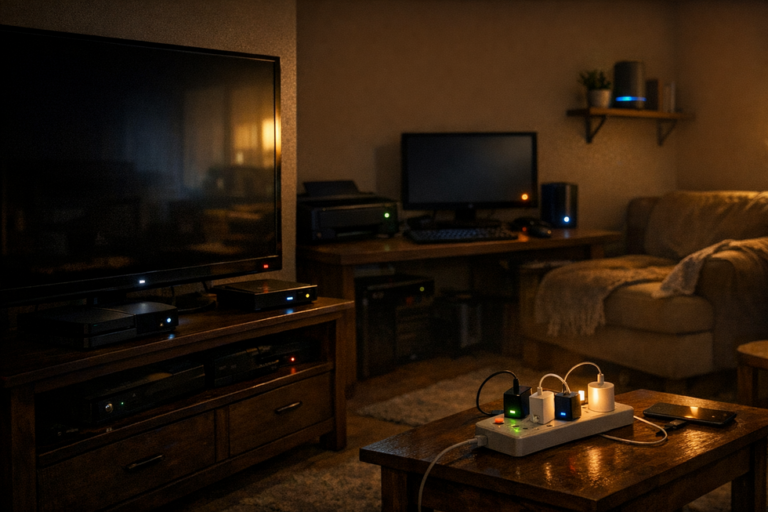
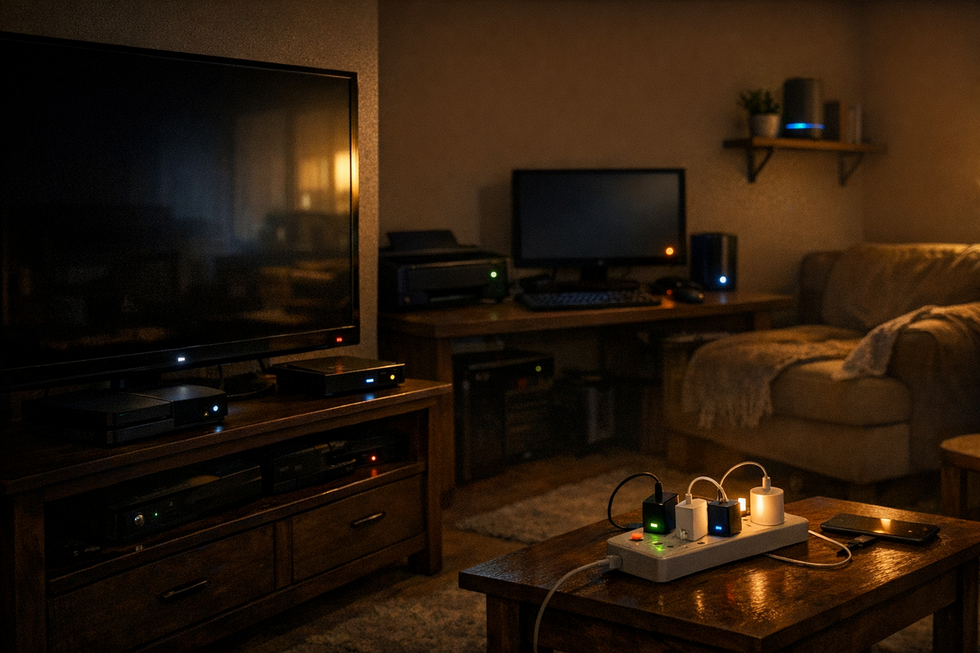
There is a hierarchy here. If you are trying to save money, do not begin with a modern phone charger that uses a fraction of a watt while empty. Begin with the entertainment center that looks innocent but contains a TV, soundbar, streaming box, game console, subwoofer, Blu-ray player, and the fossilized remains of a cable box from three billing cycles ago. 📺
The most expensive vampire loads are usually not mysterious. They are clustered where convenience is highest: media centers, home offices, charging stations, and networked devices.
A Realistic Annual Cost Breakdown 🧾
Exact costs require measuring your own devices, because standby power varies wildly by model and settings. Still, estimates can help you decide where to look first. Below are common ranges for annual standby costs, assuming electricity at roughly $0.17 per kilowatt-hour.
- Cable box or DVR: $15 to $45 per year, sometimes more for older or high-power units.
- Game console in instant-on mode: $10 to $25 per year, depending on model and settings.
- Smart TV with quick-start features: $2 to $15 per year.
- Desktop computer left sleeping, plus peripherals: $10 to $40 per year.
- Printer in standby: $2 to $10 per year.
- Microwave or range clock: $2 to $8 per year.
- Smart speaker: $3 to $10 per year.
- Chargers left plugged in without devices: often under $1 each per year, though older adapters may cost more.
- Home theater receiver or sound system: $5 to $25 per year.
- Modem and router: $15 to $40 per year combined, but these are usually intentionally left on.
A hypothetical modern home might have the following phantom load profile: a media center drawing 20 watts in standby, a home office drawing 15 watts, smart speakers and displays drawing 10 watts, kitchen electronics drawing 5 watts, and miscellaneous chargers and adapters drawing another 5 watts. That totals 55 watts always on.
At 17 cents per kilowatt-hour, 55 watts running all year costs about $82 per year. At 25 cents, it costs about $120 per year. At 35 cents, common in some high-cost regions, it costs about $169 per year.
Now imagine a larger home with multiple televisions, several consoles, a robust home office, always-on security equipment, smart devices in every room, and older standby-hungry electronics. A phantom load of 100 to 150 watts is not impossible. That can mean $150 to $300 or more per year, depending on local rates.
The sting is not that one appliance costs a fortune. The sting is that the appliances form a union. 🧛♀️
How to Find Vampire Loads in Your Home 🔦
You do not need to become an electrical engineer to identify standby waste. You need curiosity, a little arithmetic, and possibly a plug-in power meter. These small devices, often sold under names like watt meters or electricity usage monitors, plug into the wall. You then plug your appliance into the meter, and it shows how much power the appliance uses.
To hunt vampire loads effectively, focus on devices that spend long periods idle. Measuring a toaster is not useful; it uses a lot of power briefly and then none. Measuring a cable box, TV, printer, computer dock, or game console is much more revealing.
- Choose a device or power strip you suspect is using standby power.
- Plug a watt meter into the outlet, then plug the device or strip into the meter.
- Turn the device “off” as you normally would, without unplugging it.
- Read the wattage in standby mode.
- Multiply the standby watts by 8.76 to estimate annual kilowatt-hours.
- Multiply that number by your electricity rate to estimate annual cost.
For example, if your entertainment center draws 18 watts while “off,” the annual use is:
18 × 8.76 = 157.68 kWh per year
At 17 cents per kilowatt-hour, that costs:
157.68 × $0.17 = about $26.80 per year
That may not sound dramatic, but if you find five similar clusters, the numbers become more persuasive. Also, savings from vampire loads are unusually satisfying because they require no sacrifice in comfort when done intelligently. You are not taking colder showers or reading by candlelight. You are simply telling idle machines to stop snacking.
If you can measure it, you can manage it. The watt meter is the garlic necklace of home energy efficiency.
How to Stop Vampire Appliances Without Losing Your Mind 🛠️
The best strategy is selective. If you try to unplug every device after every use, you may save a few dollars and lose your will to participate in civilization. The point is to target the loads that are both wasteful and easy to control.
- Use advanced power strips: These can shut off power to accessory devices when a main device, such as a TV or computer, turns off.
- Unplug rarely used electronics: Guest room TVs, old stereos, spare printers, and seasonal gadgets do not need to wait heroically for months.
- Disable instant-on features: Game consoles, TVs, and computers often have energy-saving settings that reduce standby consumption.
- Turn off unused network features: Some devices maintain Wi-Fi, Bluetooth, or wake-on-LAN functions you may not need.
- Consolidate chargers: Use one charging station and switch it off when not in use, especially for tool batteries or camera gear.
- Choose efficient replacements: When buying new electronics, look for credible energy-efficiency labels and low standby power specifications.
- Put office gear on a switch: Monitors, speakers, docks, printers, and desk lamps can often be shut down together at day’s end.
Smart plugs can help, but use them thoughtfully. A smart plug itself consumes power, typically around half a watt to a couple of watts depending on the model and connectivity. It makes sense for controlling a larger standby load, not for policing a tiny charger that was already sipping less than the smart plug drinks.
The same goes for unplugging chargers. Yes, unplugging unused chargers saves some electricity. No, it probably will not finance your retirement. The bigger wins usually come from cable boxes, entertainment systems, office setups, and devices with fast-start or always-connected features.
There is also a safety bonus. Reducing unnecessary plugged-in devices can lower clutter and, in rare cases, reduce the risk associated with damaged cords, cheap adapters, or overheated chargers. Energy thrift and common sense occasionally share a cab. 🚕
What You Should Not Unplug 🚫
In every energy-saving conversation, someone eventually suggests unplugging everything. This is how we end up with alarm clocks blinking resentfully and family members wondering why the internet has vanished. Some devices should stay connected because their standby or continuous operation is necessary, useful, or not worth interrupting.
- Refrigerators and freezers: They cycle as needed and should remain plugged in unless empty, defrosted, and intentionally shut down.
- Medical equipment: Do not unplug essential health devices to save pennies.
- Security systems: Cameras, alarms, and sensors may need continuous power to function properly.
- Routers and modems: If you need constant internet, these should stay on, though you can schedule downtime if it suits your household.
- Devices receiving important updates: Some computers and consoles update overnight, though you can often configure this more efficiently.
- Appliances with settings you rely on: Unplugging may reset clocks, timers, or custom configurations, making the cure more annoying than the disease.
The goal is not austerity for its own sake. The goal is to avoid paying for functions you do not use. If your smart speaker brings daily value, fine. If the DVD player under the television has been waiting since 2014 for a disc that never arrives, perhaps it deserves a long nap.
The Bigger Picture: Small Loads, Large Numbers 🌍
Vampire appliances are not just a household budgeting issue. Across millions of homes, small standby loads add up to enormous electricity demand. That demand must be generated somewhere, and depending on the local grid, it may involve fossil fuels, water use, grid congestion, or higher peak loads.
To be clear, vampire loads are not the largest energy problem in most homes. Heating, cooling, water heating, clothes drying, and major appliances usually dominate the bill. If your attic insulation is terrible or your air conditioner is ancient, unplugging the toaster clock will not perform miracles. But standby power is attractive because it is often easy to reduce. It is low-hanging fruit, assuming the fruit is plugged into a power strip behind the sofa.
Efficiency standards have already helped. Many modern electronics use far less standby power than older models did. Some countries and regions have adopted standby power limits that pushed manufacturers toward better designs. But the rise of connected devices has complicated the story. The modern home is full of equipment designed to remain alert, updated, synchronized, voice-ready, app-ready, and emotionally available at all times.
This is the paradox of the smart home: every device is a little more efficient, but there are many more devices. A single smart bulb uses little electricity; a house full of hubs, speakers, cameras, displays, plugs, sensors, and assistants creates a new baseline of always-on consumption.
The future of efficiency is not merely making devices use less power. It is deciding which devices need to be awake in the first place.
So, How Much Are Vampire Appliances Really Costing You? ✅
For most households, a fair estimate is that vampire appliances cost somewhere between $100 and $250 per year. If your home is small, your devices are newer, and you already use power strips wisely, your cost may be below that. If your home is large, full of electronics, or equipped with older cable boxes, consoles, computers, and smart devices, your cost may be higher.
The useful mental shortcut is this: each continuous watt costs roughly $1.50 per year at a typical U.S. electricity rate around 17 cents per kilowatt-hour. If your rates are higher, each watt costs more. If your rates are lower, it costs less. Once you know that, vampire loads stop being spooky and become arithmetic with a cape.
The smartest approach is not dramatic. Measure or estimate your biggest standby loads. Put entertainment systems and office equipment on switched or advanced power strips. Disable instant-on modes where you do not need them. Unplug forgotten devices. Leave essential systems alone. Then enjoy the rare household victory that requires no suffering, no special ideology, and no lecture about wearing another sweater indoors.
Electricity is too useful to waste on machines pretending to sleep. Give the true necessities their power. Give the vampires a switch. 🧛♂️⚡
FAQ ⚡
What is the biggest vampire appliance in most homes?
Cable boxes, DVRs, home theater systems, desktop computer setups, and game consoles in instant-on mode are often among the biggest standby power users. The exact winner depends on the age, model, and settings of your devices.
Do phone chargers use electricity when left plugged in?
Yes, but modern phone chargers usually use very little electricity when no phone is attached, often costing less than a dollar per year. Older or poor-quality chargers may waste more, but larger electronics generally offer better savings opportunities.
How can I calculate the annual cost of a vampire appliance?
Multiply the standby wattage by 8.76 to get annual kilowatt-hours, then multiply by your electricity rate. For example, a device drawing 10 watts all year uses 87.6 kWh. At $0.17 per kWh, that costs about $14.90 per year.
Are smart plugs worth using to stop vampire power?
They can be worth it when controlling devices with meaningful standby loads, such as entertainment systems or office equipment. However, smart plugs also use electricity, so they are not always worthwhile for very small loads like efficient phone chargers.
Should I unplug my TV every night?
Not necessarily. A modern TV may use very little standby power, though quick-start and smart features can increase consumption. If the TV is part of a larger entertainment setup, using a switched power strip may be more convenient than unplugging the TV itself.
About the Author